JADAS & cJADAS Calculator
Clinical Edition - Based on 2021 ACR/PRINTO/PRCSG Criteria
JADAS10 (Full)
Includes ESR. Recommended for comprehensive assessment.
cJADAS10 (Clinical)
No ESR. Useful for quick clinical assessments.
JADAS10
JADAS27
JADAS71
Joint Assessment (JADAS10)
First click: Tender Inactive (gray) • Second click: Tender Active (black) • Third click: Swollen (red) • Fourth click: Clear
*Tender Active* = tenderness + at least 1 of: warmth and/or limited range of motion
Note: Cervical spine has only tender states (no swelling option).
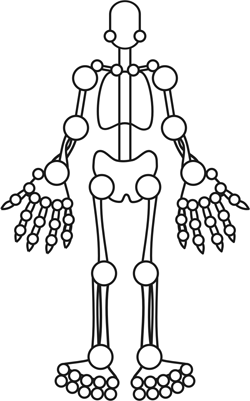
Tender Inactive
Tender Active
Swollen
Manual Joint Entry
Global Assessments & Results
0
10
0.0
0 = inactive, 10 = maximum activity
0
10
0.0
0 = very well, 10 = very poor
Normalized to 0-10 scale for score calculation.
JADAS10 Results
Inactive Disease (ID)
Active Joint Count:
0
Physician Global:
0.0
Parent Global:
0.0
Normalized ESR:
0.00
JADAS10 Score
0.00
Interpretation Guide - 2021 ACR/PRINTO/PRCSG Criteria
| Disease Activity State | JADAS10 (Oligo / Poly) | cJADAS10 (Oligo / Poly) |
|---|---|---|
| Inactive Disease (ID) | ≤ 1.4 / ≤ 2.7 | ≤ 1.1 / ≤ 2.5 |
| Minimal Disease Activity (MiDA) | 1.5-4.0 / 2.8-6.0 | 1.2-4.0 / 2.6-5.0 |
| Moderate Disease Activity (MoDA) | 4.1-13.0 / 6.1-17.0 | 4.1-12.0 / 5.1-16.0 |
| High Disease Activity (HDA) | > 13.0 / > 17.0 | > 12.0 / > 16.0 |
Citation: Trincianti et al. Arthritis & Rheumatology 2021;73:1966-1975
How to Use JADAS Calculator - Educational Guide
1
Select Assessment Mode
Choose between JADAS10 (includes ESR) or cJADAS10 (clinical version, no ESR).
- JADAS10 is recommended for comprehensive assessment when lab values are available
- cJADAS10 is useful for quick clinical assessments without laboratory data
2
Select Joint Set
Choose the joint set to examine based on your clinical needs:
- JADAS-10: Any 10 joints - recommended for routine clinical use due to simplicity and equal validity
- JADAS-27: Standardized 27-joint set
- JADAS-71: Comprehensive 71-joint set for detailed assessment
3
Perform Joint Examination
Click joints on the diagram or use manual input:
- First click: Tender Inactive (gray) - tender only, no other signs
- Second click: Tender Active (black) - tender + warmth/LOM
- Third click: Swollen (red) - always counted as active
- Fourth click: Clear
Clinical Note: Cervical spine has only tender states (no swelling option). Only Tender Active and Swollen joints count toward the active joint score.
4
Complete Global Assessments
Use the sliders to rate (in 0.5 increments):
- Physician Global Assessment: Overall disease activity (0 = no activity, 10 = maximum activity)
- Parent/Patient Global Assessment: Overall well-being (0 = very well, 10 = very poor)
5
Enter Laboratory Values (JADAS10 only)
For JADAS10, enter the ESR value. The calculator automatically normalizes it to a 0-10 scale using the formula: (ESR - 20)/10
Normalization Rules: Values <20 set to 0, values >120 set to 10
6
Interpret Results
Review the calculated score and disease activity state based on the 2021 ACR/PRINTO/PRCSG criteria.
Clinical Decision Support:
- Inactive Disease: Consider maintenance therapy
- Minimal Disease Activity: Monitor closely, consider therapy adjustment
- Moderate Disease Activity: Therapy modification recommended
- High Disease Activity: Aggressive therapy escalation needed
Additional Educational Resources
Key References:
- Trincianti et al. Arthritis & Rheumatology 2021
- ACR Juvenile Arthritis Guidelines
- PRINTO Classification Criteria
Clinical Pearls:
- Use consistent examination technique
- Document joint status changes over time
- Consider patient age and development stage